

The Critical Role of Data Freshness in Business Decision-Making in 2025
Stale data costs businesses 30% of revenue. Learn how data freshness drives better decisions, efficiency, and forecasting.


.png)
Ever been in a meeting where the numbers just didn't add up? You're not alone. Studies show that up to 66% of business professionals use outdated or inaccurate data. When the stats don't match, it creates confusion, wasted time, and poor decisions.
Research reveals that businesses lose an estimated 30% of revenue each year due to poor data quality. That's a significant hit to the bottom line. Ensuring data freshness isn't just about staying current – it's about protecting profits and driving better outcomes.
Data freshness is something our team at OWOX thinks about constantly – not just as a product problem, but as a business problem. In this article, we'll break down how fresh data impacts decision-making, customer satisfaction, efficiency, forecasting, and time to market. We'll also cover the key factors that affect data freshness and share 7 metrics to measure it.
What is data freshness?
Data freshness describes how current and relevant information is at a given moment – specifically, how long ago the data was collected compared to right now.

If you're tracking website traffic, fresh data shows you real-time visitor numbers. Stale data from last week is far less useful for immediate decisions. That's why monitoring data quality matters – it ensures the information you act on stays accurate and up-to-date.
The importance of data freshness for competitive edge
Fresh data isn't a nice-to-have. It's a strategic lever that affects speed, accuracy, and customer trust across every team. Here are the most compelling reasons to prioritize it.
Reason #1: Informed decision-making
Immediate insights from fresh data empower decision-makers with the most relevant information available, giving them an edge over competitors still working with last week's numbers.
With fresh data, companies can see which products are selling well in real time. If a product suddenly spikes in demand, they can restock quickly rather than discover the stockout after the fact. This helps protect revenue and keep customers satisfied.
Reason #2: Better customer experience
Speaking of customers – fresh data lets businesses personalize their offerings in real time, making customers feel understood and valued. If you've recently browsed running shoes on a retail website, the system can surface similar products during your very next visit.

This tailored approach saves customers time by presenting relevant options upfront – and it signals that the retailer actually understands their preferences.
Reason #3: Optimized operational efficiency
Fresh data keeps operations running smoothly. Imagine managing a warehouse: with up-to-date inventory data, you can see which products are moving quickly and whether stock levels are adequate. This prevents both stockouts and costly overstocking.
It also surfaces issues early – shipment delays, distribution bottlenecks – so teams can respond before small problems become expensive ones.
Reason #4: Predictive forecasting and trend insights
Predictive forecasting depends on data that reflects reality today, not six weeks ago. With fresh inputs, companies can analyze market trends and predict future demand far more accurately.
A retailer can use real-time sales data to anticipate which products will spike during upcoming seasons or events – and plan accordingly rather than reacting after the fact.
Reason #5: Faster time to market
With up-to-date information, companies make decisions and launch offerings more quickly. If a new trend emerges, teams can adjust strategy immediately without waiting for a scheduled batch report.
This agility lets businesses stay ahead of the competition and capture opportunities sooner.
Reason #6: Upholding quality assurance
Keeping products and services at high quality requires accurate, timely data for monitoring production and delivery in real time. Data quality issues surface faster when the underlying data is fresh – and fixes happen before customers are affected.
Reason #7: Strategic planning
Strategic plans built on stale data are built on assumptions. By looking at what's happening in the market right now, leadership teams can make better decisions about where to invest next. Fresh data helps companies align product, marketing, and operations around what customers actually want today.
Key factors affecting data freshness
The freshness of your data depends on several interconnected factors. Understanding each one helps you identify where freshness breaks down in your own stack.
Factor #1: Data source

Data directly from customers is typically the freshest because it's firsthand, real-time information. Common sources include:
- customer feedback
- online surveys
- purchase history
- website interactions
- social media engagement
- customer support interactions
Factor #2: Frequency of data collection
How often data is collected directly determines its freshness. Different teams need data at different cadences – some need near-real-time updates, others can work with daily or weekly refreshes. Aligning collection frequency to actual business needs ensures teams aren't making decisions on yesterday's data when they need today's.
Factor #3: Data preparation frequency
Collecting data is only half the equation. You also need to blend, merge, and organize it before it's usable in reports. This preparation step is critical – and it's often where freshness gets lost. The analyst who writes the logic that joins and structures data is the keeper of freshness at this layer. Only properly prepared data produces decisions built on accurate, current information.
7 key metrics to measure data freshness
Knowing how to measure data freshness is essential for keeping information accurate and relevant, and for overcoming common data quality issues. Here are 7 practical ways to track freshness across your data pipeline.
Collection frequency
- Choose how often to collect. Determine how frequently different stakeholders need data and calibrate collection intervals accordingly – balancing speed with cost.
- Use automation. Set up systems to collect data automatically at regular intervals rather than relying on manual exports.
- Monitor patterns. Watch for shifts in data behavior over time to spot emerging trends and adjust collection frequency as needed.
Latency and processing time
- Audit data processing. Measure how efficiently data moves through your pipeline to identify where delays accumulate.
- Use faster methods. Parallel processing or data compression can reduce lag significantly.
- Review system performance regularly. Scheduled performance checks surface bottlenecks before they cascade into stale reports.
Triggered and scheduled pipelines
- Use events to trigger data updates. Set up pipelines that react when upstream data changes rather than running on a fixed clock.
- Integrate live data where possible. Bringing data together from different sources in near-real-time ensures downstream reports stay current.
- Monitor pipeline health. Watch scheduled and triggered pipelines to catch failures or delays quickly.
Data deterioration and pertinence
- Define what "relevant" means. Set explicit criteria for freshness and relevance based on business use case – a marketing dashboard has different tolerance than a financial audit trail.
- Build quality checks into pipelines. Automated validation catches issues before stale or inaccurate data reaches a report.
- Review data sources regularly. Sources change over time – APIs update their schemas, vendors shift their data windows. Audit regularly to confirm sources remain reliable.
Time-based measurements
- Set freshness targets. Define acceptable data age thresholds for each use case so teams know when data has crossed the stale boundary.
- Track data age in dashboards. Surface the "last updated" timestamp alongside every key metric so stakeholders can judge freshness themselves.
- Use historical patterns to plan collection. Past data cycles reveal when updates arrive, which helps you schedule refreshes at the right moment.
Monitoring and notification systems
- Monitor data freshness in real time. Use tooling that flags when a dataset hasn't refreshed within its expected window.
- Set alerts. Automated notifications when data goes stale prevent teams from discovering the problem in a board meeting.
- Review alert rules regularly. As business needs evolve, the thresholds that define "stale" should evolve with them.
Industry-specific variables
- Understand your industry's freshness norms. A fast-moving e-commerce business has very different data-freshness expectations than a monthly-close finance team.
- Involve domain experts. People who live in the data daily know which metrics go stale fastest and which can tolerate a longer lag.
- Stay current with compliance requirements. Regulations in finance, healthcare, and other industries may mandate specific data-freshness standards.

Overcoming data freshness challenges for businesses
Companies face predictable patterns when data freshness breaks down. Here are the four most common challenges – and how to solve them with current tooling.
Challenge #1: Outdated data in reports
The problem: Campaign data from Facebook Ads and Google Ads typically revises itself over several days. Reports built on a snapshot go stale quickly, leading to analysis on numbers that will change.
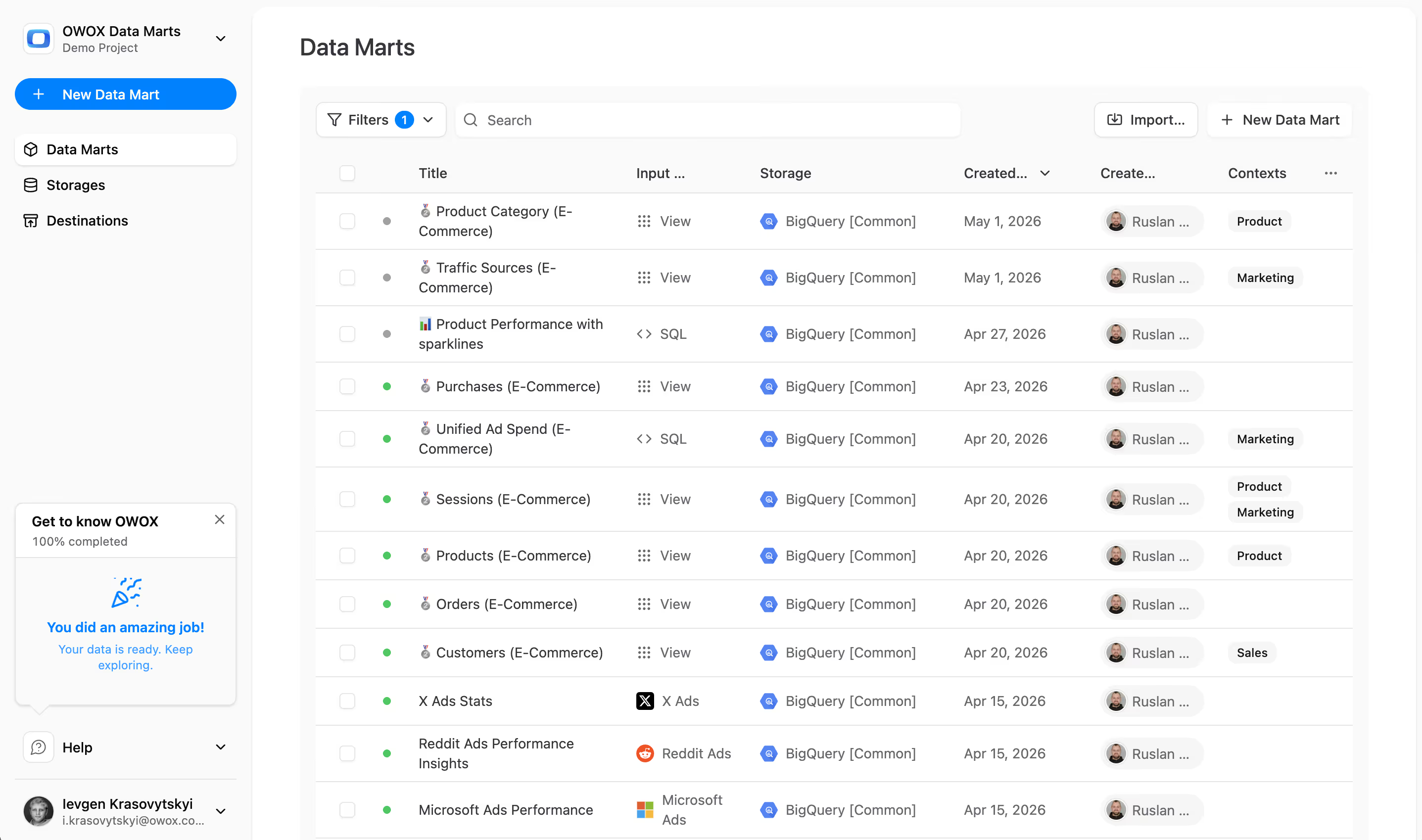
The solution: Automate data collection so historical periods are refreshed on a schedule. Analysts can define a SQL Data Mart in OWOX that joins and aggregates ad spend data, then schedule it to run on the cadence that matches each platform's data finalization window. Every report built on that Data Mart refreshes automatically – no manual re-export needed.
Challenge #2: Data silos from different sources
The problem: Different data sources update on different schedules. Running a report that joins Google Ads with CRM data is problematic if one source is two days behind the other – and manually orchestrating these refresh cycles wastes engineering time.
The solution: Use dependency-based scheduling so downstream Data Marts only refresh after upstream sources have completed their own updates. OWOX supports scheduling and triggers at the mart level, meaning the analyst's SQL runs exactly when the data it depends on is ready – not on a fixed clock that may be off.
Challenge #3: Manual reporting
The problem: Manually exporting data from a warehouse to Google Sheets is the most common freshness killer in marketing and finance teams. It takes time, it's error-prone, and the moment the export is done, the data starts aging.
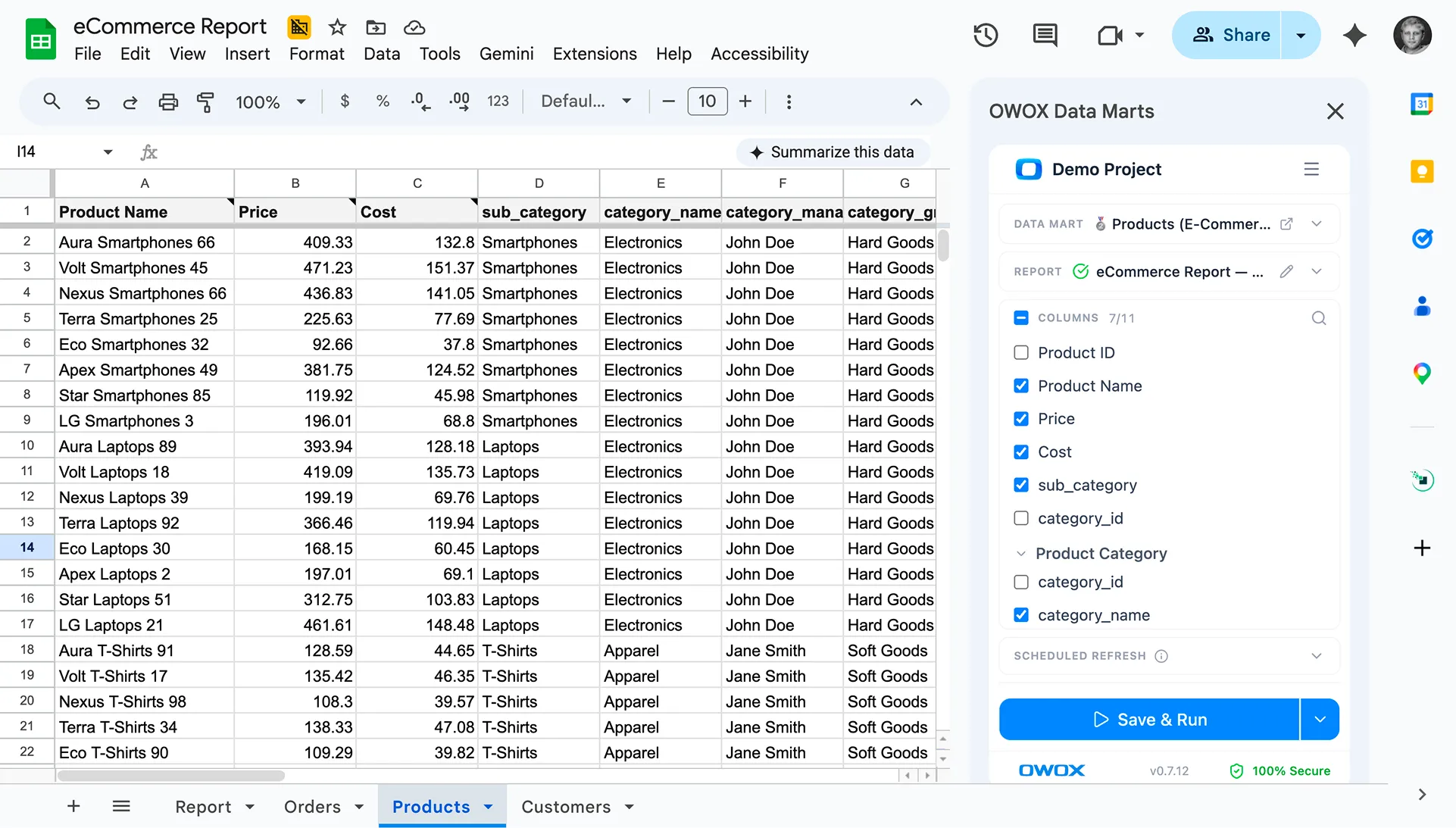
The solution: Analysts define the report logic as a governed SQL Data Mart. Business users then connect to that mart using the OWOX Sheets Extension – browsing the Data Mart library inside Google Sheets, selecting columns, applying filters, and refreshing on demand. No SQL required on the business user's side. When the analyst updates the mart logic, every connected Sheet reflects the change automatically.
Challenge #4: Real-time data access for managers
The problem: Managers need the latest numbers before key meetings but can't (or shouldn't) access the warehouse directly – either because of technical complexity or internal access policies.
The solution: With governed Data Marts and the OWOX Sheets Extension, managers access scheduled, analyst-approved reports through a service account – no warehouse credentials required. Every number they see traces back to SQL the analyst wrote and approved. No AI hallucinations, no uncontrolled ad-hoc queries – just a clean audit trail from source to decision.
6 methods to ensure data freshness
In the past, companies ensured freshness through manual processes and periodic updates. Those approaches can't scale to the volume, variety, and velocity of data teams handle today. Here are six methods that do.
Method #1: Data extraction and loading
- Automate data extraction from source systems to eliminate manual pull cycles and reduce lag.
- Validate data immediately after extraction to catch errors before they propagate downstream.
- Maintain consistency checks during the loading process to ensure reliable, trustworthy data arrives in the warehouse.
Method #2: Data normalization and transformation
- Standardize formats across sources so joins produce clean, consistent results.
- Remove duplicates and handle nulls as part of the analyst-defined SQL logic – not as a manual cleanup step.
- Keep transformation logic in governed, version-controlled SQL so changes are auditable and reproducible.
Method #3: Schedule processes
- Set regular intervals or dependency-based triggers for data refresh that match actual business cadence.
- Automate scheduling to remove human bottlenecks and ensure consistency.
- Monitor scheduled jobs so failures surface as alerts, not as stale dashboards.
Method #4: Near-real-time updates
- For use cases that genuinely require it, push data updates as close to real time as the source allows.
- Capture incremental changes in source systems quickly rather than waiting for end-of-day batch runs.
- Balance real-time investment against actual decision cadence – many teams don't need sub-minute freshness.
Method #5: Set up a monitoring system
- Use alerts to notify data owners immediately when freshness SLAs are breached.
- Track key freshness metrics – data age, last-updated timestamps, pipeline success rates.
- Audit data processes regularly to find and fix bottlenecks before they affect reporting.
Method #6: Align with business goals
- Make sure your data freshness strategy maps to actual decision cadences across teams.
- Prioritize freshness investments on the data sources that drive the highest-impact decisions.
- Stay flexible – as business priorities shift, the sources that need freshest data will shift too.
Applications of data freshness across industries
The need for fresh data shows up differently across sectors – but the underlying need is the same: teams want to act on what's true now, not what was true last week. Here's how freshness manifests in key industries.
Digital commerce and internet retail
Online stores once updated information in batches, creating delays in inventory visibility and customer personalization. Now, fresh data enables real-time inventory management, dynamic pricing, and personalized recommendations. Teams that can see exactly what's happening in their store right now make better restocking decisions and improve the shopping experience simultaneously.
Financial sector
Finance teams benefit from access to real-time transaction data for fraud detection, investment decisions, and risk management. Data that's even a few hours old can mean a missed signal. Fresh data also supports accurate reconciliation across distributed systems, which matters for auditability and compliance.
Healthcare
Healthcare providers who can access current patient information can track medical histories accurately and flag risk earlier. Fresh data enables better clinical decisions, smoother operations, and faster progress in research – all of which translate directly to patient outcomes.
Social networking and advertising platforms
Instead of relying on static user profiles and batch-updated ad targeting, platforms with fresh data can deliver personalized content and instant engagement analytics. Marketers who see campaign performance in near-real-time can reallocate spend before budget is wasted on underperforming placements.
How OWOX helps teams maintain data freshness
Most data freshness problems aren't really technology problems – they're governance problems. Data is stale because nobody owns the refresh schedule, because transformation logic lives in someone's head, or because business users can't access the warehouse without asking an analyst to run a query for them.
OWOX addresses this through a structured, analyst-led workflow:
- Analysts define the logic. They write SQL – session calculations, cost attribution, cross-channel joins – and publish it as a governed OWOX Data Mart. The mart gets a description, field definitions, and an owner. The logic is version-controlled and auditable.
- OWOX governs and schedules it. Refresh schedules run automatically. Dependency-based triggers mean downstream marts only update after upstream sources are ready – no manual orchestration needed.
- Business users self-serve from Sheets. With the OWOX Sheets Extension, anyone on the marketing, finance, or ops team can browse the Data Mart library, pick the fields they need, apply filters, and refresh – all from inside Google Sheets, with no SQL. The data they see comes from analyst-approved SQL, so there are no hallucinations, no uncontrolled ad-hoc queries, and a full audit trail from source to spreadsheet.
- AI Insights deliver narrative summaries on schedule. OWOX AI Insights lets analysts define a Markdown report template with metric placeholders. Each placeholder resolves to a deterministic, analyst-approved SQL query – not freeform AI generation. The AI writes the prose around those numbers and delivers the summary to Slack, Teams, or Email on a schedule. Fresh numbers, automatically narrated, zero hallucinations.
Data stays in your warehouse throughout. Whether you're on BigQuery, Snowflake, Redshift, Athena, or Databricks – OWOX governs the data where it already lives. No data moves to a vendor cloud, and you keep full control of history, lineage, and access.
Frequently asked questions
What is data freshness and why does it matter?
Data freshness describes how current and relevant your data is at a given moment – specifically, how much time has passed since it was collected or updated. It matters because decisions made on stale data lead to wasted budget, missed opportunities, and loss of competitive advantage. Teams that act on fresh, accurate information consistently outperform those relying on last week's reports.
What are the main factors that affect data freshness?
The three main factors are: the data source itself (how often it updates), the collection frequency (how often you pull from it), and the preparation frequency (how often the transformation logic runs to blend and structure data for reporting). Each layer can introduce lag – and freshness breaks at whichever layer is slowest.
How do you measure data freshness?
Key metrics include collection frequency, pipeline latency, data age (time since last update), and whether the data has exceeded its defined freshness SLA. Monitoring systems that track these metrics and alert teams when thresholds are breached are the most reliable way to stay ahead of staleness.
What is a data freshness SLA?
A data freshness SLA (Service Level Agreement) is an explicit commitment about how old data is allowed to be before it's considered unfit for use. For example, a marketing team might define that campaign spend data must be no more than 6 hours old. SLAs create accountability and make it easier to detect and escalate freshness violations.
How can teams ensure data freshness without constant manual effort?
Automation is the answer. Analysts define the transformation and preparation logic once – as SQL in a governed Data Mart – and schedule it to run automatically. Business users connect to that mart from their reporting tool of choice (such as Google Sheets via the OWOX Sheets Extension) and refresh on demand. Dependency-based triggers ensure downstream data only updates when upstream data is ready, eliminating the need for manual orchestration.
Frequently asked questions
.png)
.png)


"AI by its nature will hallucinate. You need guardrails so you can trust your data."
"We had six or seven different channels and no single source of truth. It was almost impossible"
"We regained time. And time is the one resource that never comes back."